
Odoo has good reporting built in - list, pivot and graph views on every app, and spreadsheets and dashboards in Enterprise. But sooner or later someone asks a question that crosses apps, companies or even databases: revenue and open receivables on one page, sales from three Odoo databases side by side, a dashboard for people who never log in to Odoo. That is where Metabase fits. This guide shows how we connect Metabase to Odoo, the parts of Odoo's data model you need to know, working SQL, and how to report across several Odoo databases at once.
Key takeaways
- Metabase is an open-source BI tool. It connects straight to the PostgreSQL database behind Odoo, so dashboards show live data with no export step.
- Connect with a dedicated read-only PostgreSQL user, never Odoo's own database user, and keep sensitive tables out of reach.
- Direct database access is possible when Odoo runs on your own server. On Odoo Online and Odoo.sh you copy the data into a reporting database through Odoo's external API instead.
- Odoo stores translated names as JSON, keeps cancelled and draft records next to real ones, and splits invoices into journal items - know these and your numbers will match Odoo's.
- Metabase does not join across databases. To combine several Odoo databases, use a reporting database with PostgreSQL's
postgres_fdw, or a data warehouse.
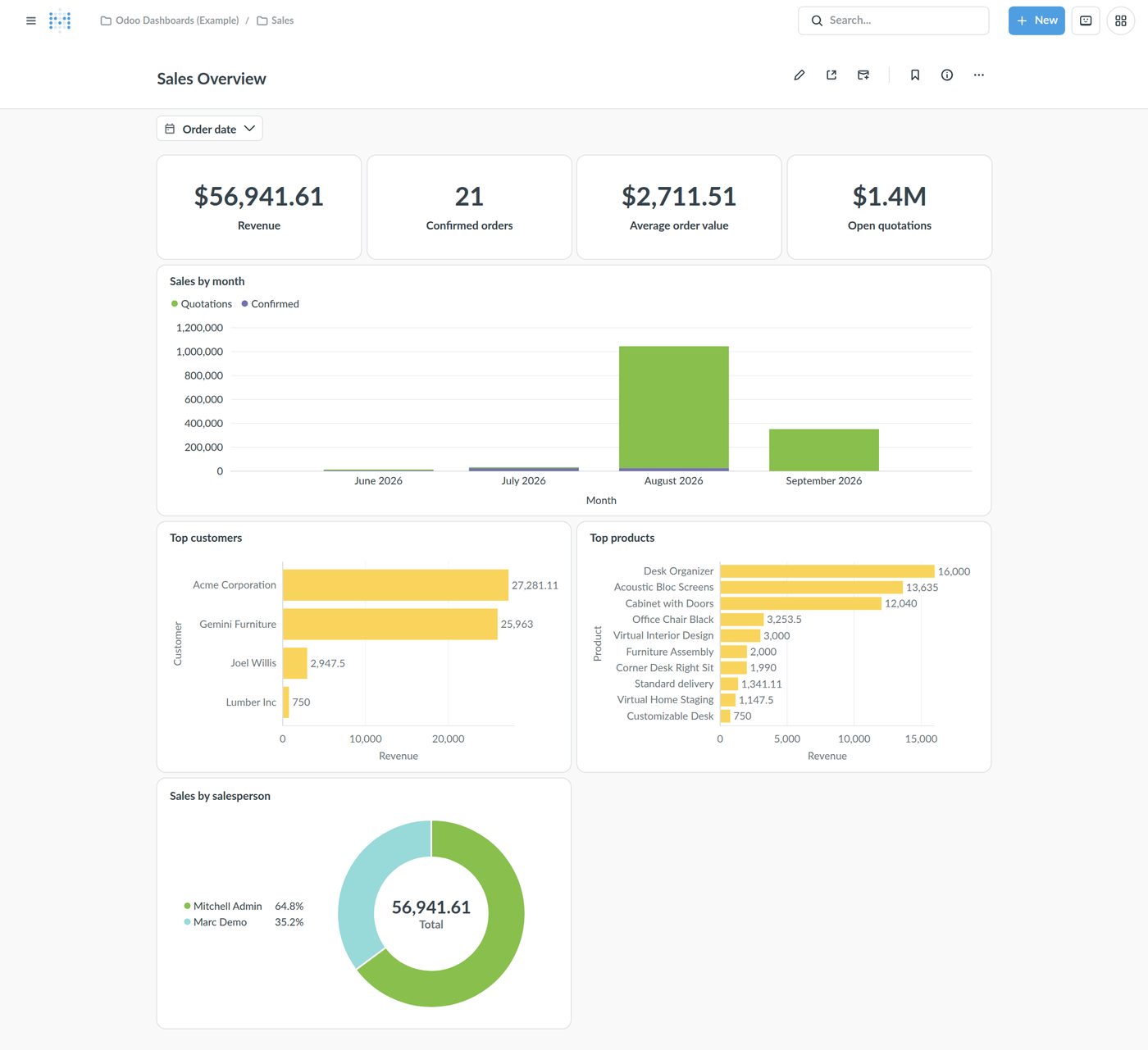
Why Metabase for Odoo?
- Across apps: one question can join sales, invoices, stock, CRM and HR tables, because they all live in the same PostgreSQL database.
- Across databases: several Odoo databases - or Odoo plus other systems - in one place.
- For everyone: managers, investors or a bank can see dashboards without an Odoo user licence.
- Two ways to ask: a point-and-click query builder for business users, and a SQL editor with filters for analysts.
- Free to start: the open-source edition runs on your own server; paid editions add features such as row- and column-level security.
Metabase does not replace Odoo's own reports, which respect each user's access rights and let you click through to the record. Use Odoo's reports inside Odoo, and Metabase for management dashboards and analysis that crosses boundaries.
Can I connect Metabase to my Odoo?
It depends on where Odoo runs, because Metabase needs to reach the PostgreSQL database:
| Odoo hosting | Direct PostgreSQL connection | What we do |
|---|---|---|
| On-premise (your server or cloud) | Yes | A read-only database user for Metabase, ideally through a private network or SSH tunnel. |
| Odoo.sh | No supported way from outside | Copy the data you report on into your own PostgreSQL database through Odoo's external API on a schedule, and point Metabase there. |
| Odoo Online | No | The same API-based copy. External API access needs the Custom plan. |
Not sure which you have, or which suits you? Our guide to Odoo Online vs Odoo.sh vs on-premise compares them.
Four ways to set it up
| Setup | How it works | Use it when |
|---|---|---|
| 1. Direct, read-only | Metabase reads the live Odoo database with a read-only user. | One database, modest data volumes. The simplest start. |
| 2. Read replica | A PostgreSQL streaming replica of the Odoo database; Metabase reads the replica. | Heavy dashboards that must not slow Odoo down. |
| 3. Reporting database (postgres_fdw) | A small PostgreSQL database that reads tables from several Odoo databases and combines them in views. | Several Odoo databases on PostgreSQL that you want side by side. |
| 4. Data warehouse | A scheduled job (ETL) copies Odoo data - via SQL or the API - into a warehouse. | Odoo Online or Odoo.sh, many sources, or large history. |
Step 1: Run Metabase
The quickest start is Docker. Metabase's own command starts it on port 3000:
docker run -d -p 3000:3000 --name metabase metabase/metabase
Out of the box Metabase keeps its own settings, questions and dashboards in an embedded H2 file, and Metabase warns that removing the container loses them. For production, give it a PostgreSQL database of its own:
# a separate, empty database for Metabase's own data (not the Odoo database)
docker run -d -p 127.0.0.1:3000:3000 --name metabase --restart unless-stopped \
  -e MB_DB_TYPE=postgres -e MB_DB_HOST=db.internal -e MB_DB_PORT=5432 \
  -e MB_DB_DBNAME=metabase -e MB_DB_USER=metabase -e MB_DB_PASS='a-strong-password' \
  metabase/metabase
Put it behind nginx with HTTPS, the same way as Odoo, and create the admin account in the browser.
Step 2: Create a read-only PostgreSQL user
Never give Metabase Odoo's own database user - it can change and delete everything. Create a reporting user that can only read, and make every session read-only as a second line of defence. Run this as a PostgreSQL superuser, replacing odoo_db with your database name and odoo with the user Odoo runs as:
CREATE ROLE metabase_ro LOGIN PASSWORD 'a-long-random-password';
ALTER ROLE metabase_ro SET default_transaction_read_only = on;

GRANT CONNECT ON DATABASE odoo_db TO metabase_ro;
\c odoo_db
GRANT USAGE ON SCHEMA public TO metabase_ro;
GRANT SELECT ON ALL TABLES IN SCHEMA public TO metabase_ro;
-- tables Odoo creates later (new apps, upgrades) become readable too
ALTER DEFAULT PRIVILEGES FOR ROLE odoo IN SCHEMA public GRANT SELECT ON TABLES TO metabase_ro;

-- keep secrets out of reach: API keys, system parameters, login data
REVOKE SELECT ON res_users_apikeys, ir_config_parameter FROM metabase_ro;
REVOKE SELECT ON res_users FROM metabase_ro;
GRANT SELECT (id, login, partner_id, company_id, active, share) ON res_users TO metabase_ro;
The last three lines matter: system parameters can hold keys for payment providers and other integrations, and res_users contains password hashes. A column-level grant still lets you report "orders per salesperson". Review the list for the apps you use - payroll and HR tables are worth restricting too.
Allow the Metabase server to reach PostgreSQL (in pg_hba.conf and your firewall) only from its own address, never from the whole internet.
Step 3: Connect the Odoo database in Metabase
- In Metabase, go to Admin settings > Databases > Add a database and choose PostgreSQL.
- Give it a clear display name (for example "Odoo - Production"), and enter the host, port 5432, the database name,
metabase_roand its password. Enable SSL if the connection leaves the server. - Save. Metabase syncs the schema and scans field values; on an Odoo database with hundreds of tables the first sync takes a few minutes.
- In Table Metadata, hide the technical tables you will never use (
ir_*,bus_*,mail_*and many*_reltables) and give the important columns friendly names.
Odoo's data model: the tables you will use
Every Odoo model is a PostgreSQL table: the model name with dots replaced by underscores (sale.order is sale_order).
| Subject | Tables | Notes |
|---|---|---|
| Customers, vendors, contacts | res_partner | Companies and their contact people; group by commercial_partner_id to report per company. |
| Sales | sale_order, sale_order_line | state: draft, sent, sale, cancel. |
| Purchases | purchase_order, purchase_order_line | Confirmed orders have state purchase. |
| Invoices and bills | account_move | move_type: out_invoice, out_refund, in_invoice, in_refund, entry. Count only state = 'posted'. |
| Accounting detail | account_move_line, account_account | balance = debit minus credit; parent_state is the entry's state. |
| Products | product_template, product_product | Order lines point to the variant (product_product); the name is on the template. |
| Stock | stock_quant, stock_move, stock_location | Current quantities by location; moves for history. |
| CRM | crm_lead, crm_stage | Leads and opportunities share one table (type). |
| Companies, users | res_company, res_users | Filter by company_id in multi-company databases. |
Five things that trip people up
- Translated names are JSON. Product names, CRM stages, product categories and other translatable fields are stored per language: use
name->>'en_US'. - Drafts and cancellations sit next to real records. Filter on
state(andactivefor archivable records), or your totals include quotations and cancelled invoices. - Credit notes reduce revenue. Use the
*_signedamounts onaccount_moveand includeout_refund, or sumbalanceon journal items. - Lines are not always products. Section and note lines live in the same table; exclude them with
display_type IS NULLon sale order lines. - Several companies and currencies. Group or filter by
company_id, and use the company-currency (*_signed) amounts when orders are in different currencies.
Step 4: Questions and SQL that match Odoo
Business users can build questions with Metabase's query builder - pick a table, filter, summarise, choose a chart. Analysts use the SQL editor. These queries run on Odoo 19:
Monthly invoiced revenue, net of credit notes
SELECT date_trunc('month', m.invoice_date)::date AS month,
       round(sum(m.amount_untaxed_signed), 2)   AS revenue
FROM account_move m
WHERE m.move_type IN ('out_invoice', 'out_refund')
  AND m.state = 'posted'
GROUP BY 1
ORDER BY 1;
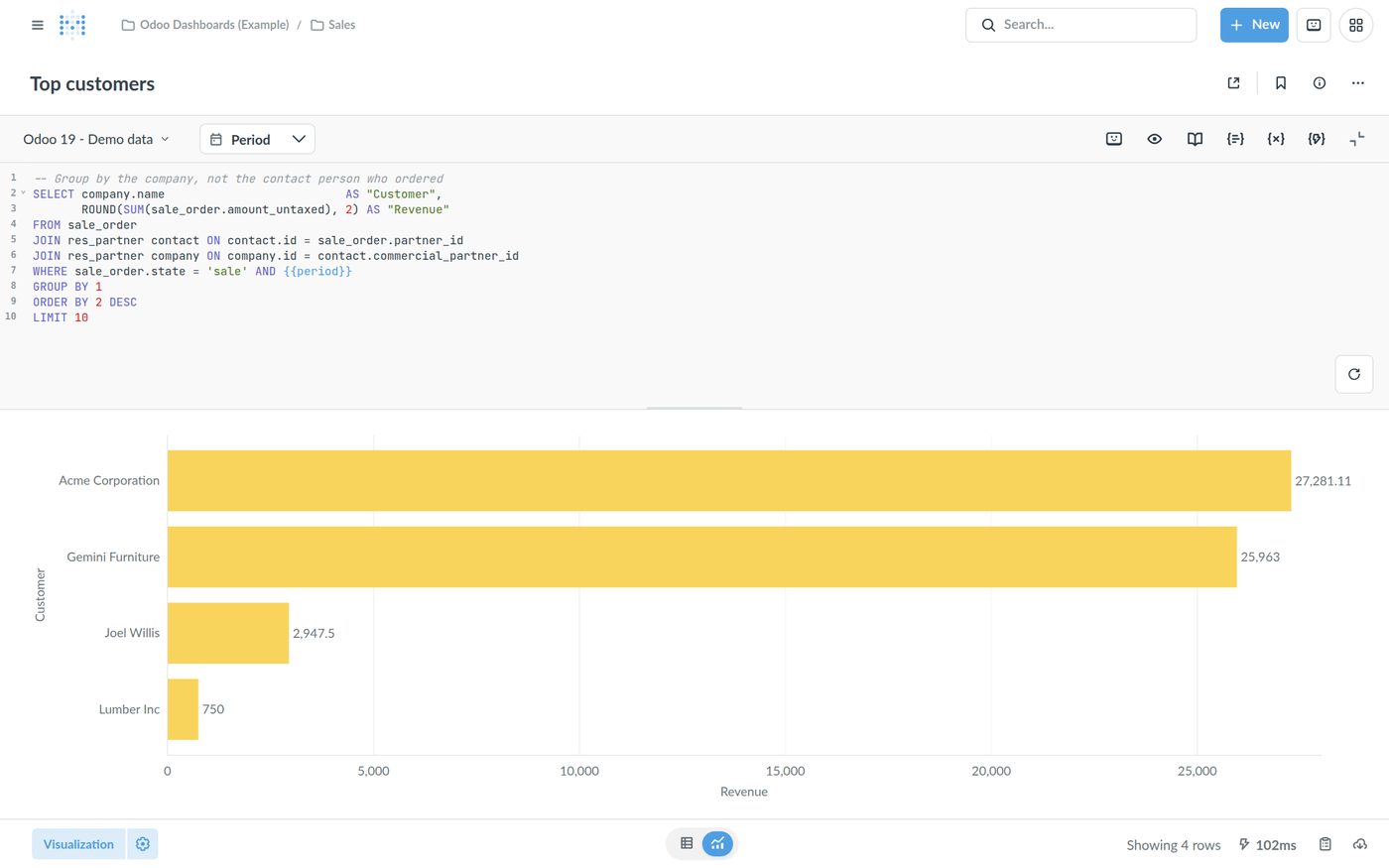
Top products by confirmed sales
SELECT pt.name->>'en_US'                 AS product,
       round(sum(sol.price_subtotal), 2) AS revenue
FROM sale_order_line sol
JOIN sale_order so       ON so.id = sol.order_id
JOIN product_product pp  ON pp.id = sol.product_id
JOIN product_template pt ON pt.id = pp.product_tmpl_id
WHERE so.state = 'sale' AND sol.display_type IS NULL
GROUP BY 1
ORDER BY 2 DESC
LIMIT 10;
CRM pipeline by stage
SELECT s.name->>'en_US'                    AS stage,
       count(*)                          AS opportunities,
       round(sum(l.expected_revenue), 2) AS expected_revenue
FROM crm_lead l
JOIN crm_stage s ON s.id = l.stage_id
WHERE l.type = 'opportunity' AND l.active
GROUP BY s.name, s.sequence
ORDER BY s.sequence;
Open receivables per customer
SELECT p.name                              AS customer,
       round(sum(aml.amount_residual), 2) AS open_amount
FROM account_move_line aml
JOIN account_account a ON a.id = aml.account_id
JOIN res_partner p     ON p.id = aml.partner_id
WHERE aml.parent_state = 'posted'
  AND a.account_type = 'asset_receivable'
  AND NOT aml.reconciled
GROUP BY 1
HAVING sum(aml.amount_residual) <> 0
ORDER BY 2 DESC;
Add a date filter
In the SQL editor, type {{period}} in the WHERE clause, set the variable to Field filter and map it to a date column such as sale_order.date_order. Metabase then shows a date picker on the question and lets you wire it to a dashboard filter, so one filter drives every card.
Step 5: Models - a clean starting point for everyone
Raw Odoo tables are not friendly for business users. A Metabase model is a curated dataset - built with the query builder or SQL - that others start their questions from. For example, a "Sales Orders" model joins sale_order with the customer, salesperson and company, keeps only confirmed orders and gives every column a readable name.
- Create one from the Models section (or turn a saved question into a model).
- Edit its metadata: display names, descriptions and, most importantly, each column's type, which gives the right filters and charts.
- Models rank first in search and can be persisted for faster dashboards.
Recent Metabase releases introduce Transforms, and Metabase says models are gradually being phased out in their favour. The idea stays the same: define your Odoo business entities once, cleanly, and build everything on top.
Step 6: Dashboards, collections and permissions
Combine questions into dashboards with shared filters, and organise them in collections per team. Then decide who sees what: group your users (Sales Team, Finance Team, Management) and give each group access to its collections only.
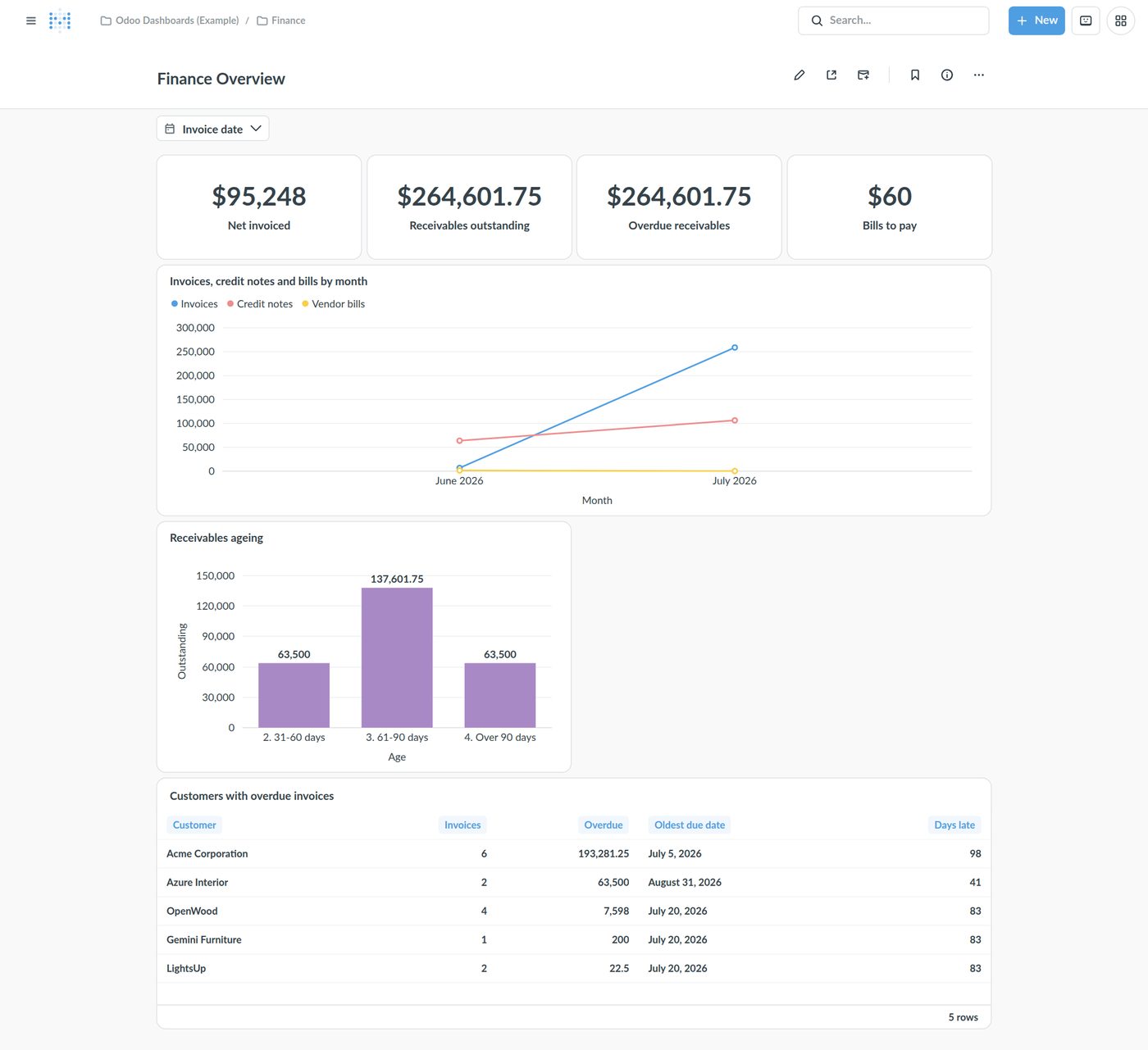
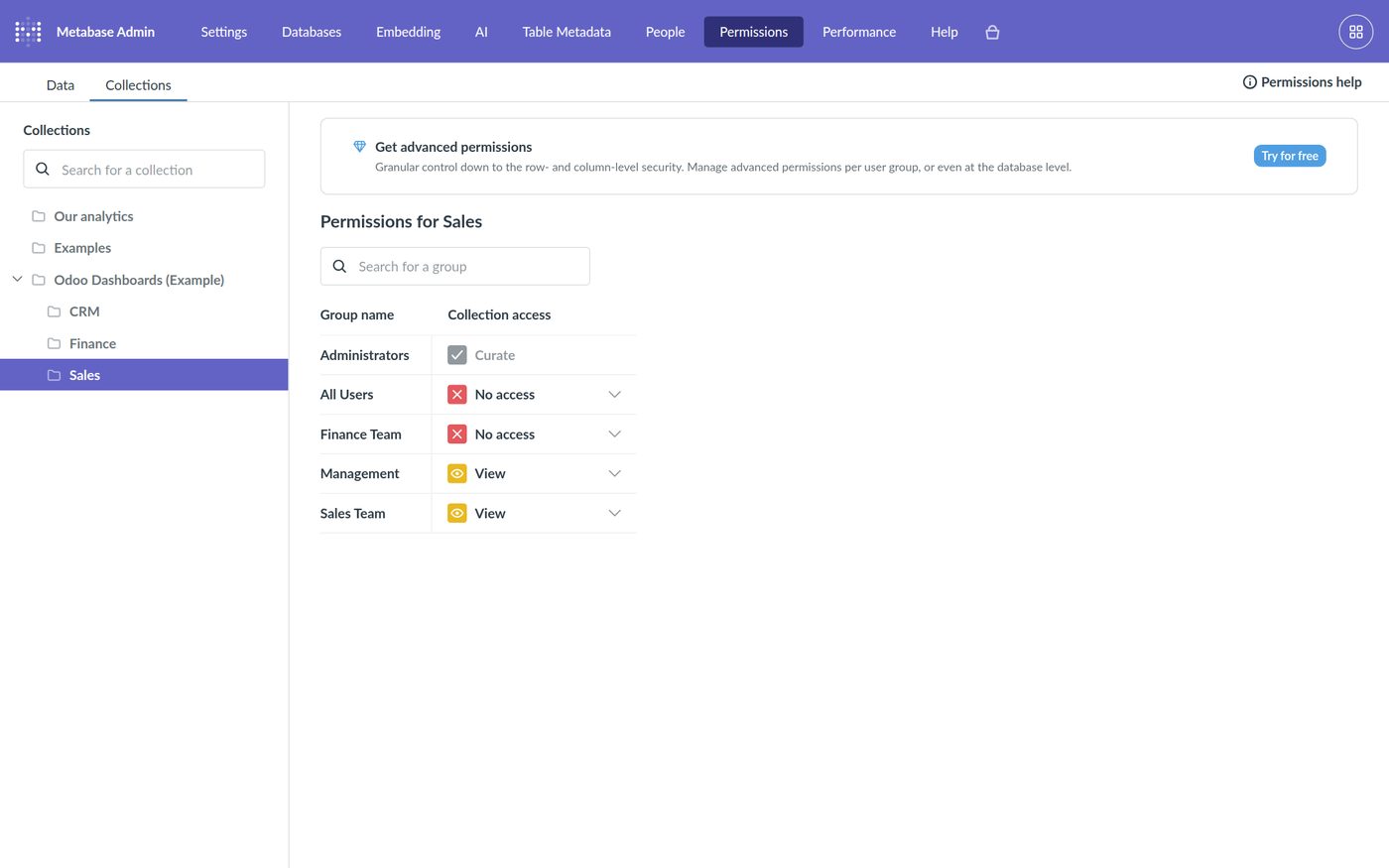
Note that Metabase permissions are separate from Odoo's. A user who can query a table in Metabase sees all of its rows, whatever their Odoo access rights. Restrict tables per group in Metabase's data permissions, and use row-level security (a paid Metabase feature) when, for example, each salesperson may only see their own customers.
Reporting across several Odoo databases
Many businesses run more than one Odoo database - one per country or company, a group of franchises, or a consultant's clients. Metabase can connect to all of them, but it cannot join or combine data across separate database connections; Metabase explains that it sends each query to one database and is not a query engine. You have three options.
Option A: one connection per database, side by side
Add each Odoo database in Metabase and build the same dashboard on each. Simple, but you cannot see a group total or compare in one chart.
Option B: a reporting database with postgres_fdw
When the Odoo databases run on PostgreSQL servers you control, create a small reporting database that reads their tables through PostgreSQL's foreign data wrapper, and combine them in views. Metabase then connects to the reporting database only. We built and tested exactly this setup across two Odoo 19 databases:
-- in a new, empty database, e.g. odoo_reporting (as a superuser)
CREATE EXTENSION postgres_fdw;

CREATE SERVER odoo_us FOREIGN DATA WRAPPER postgres_fdw
  OPTIONS (host '10.0.0.11', port '5432', dbname 'odoo_us');
CREATE SERVER odoo_eu FOREIGN DATA WRAPPER postgres_fdw
  OPTIONS (host '10.0.0.12', port '5432', dbname 'odoo_eu');

-- connect to each Odoo database with its read-only user
CREATE USER MAPPING FOR CURRENT_USER SERVER odoo_us
  OPTIONS (user 'metabase_ro', password '...');
CREATE USER MAPPING FOR CURRENT_USER SERVER odoo_eu
  OPTIONS (user 'metabase_ro', password '...');

-- bring in only the tables you report on, one schema per database
CREATE SCHEMA odoo_us;
CREATE SCHEMA odoo_eu;
IMPORT FOREIGN SCHEMA public LIMIT TO (sale_order, res_partner, res_company, account_move)
  FROM SERVER odoo_us INTO odoo_us;
IMPORT FOREIGN SCHEMA public LIMIT TO (sale_order, res_partner, res_company, account_move)
  FROM SERVER odoo_eu INTO odoo_eu;

-- one view with a column saying where each row comes from
CREATE VIEW all_sales AS
  SELECT 'US' AS source_db, c.name AS company, so.name AS order_ref,
         so.date_order, so.state, so.amount_untaxed, so.currency_id
    FROM odoo_us.sale_order so JOIN odoo_us.res_company c ON c.id = so.company_id
  UNION ALL
  SELECT 'EU', c.name, so.name, so.date_order, so.state, so.amount_untaxed, so.currency_id
    FROM odoo_eu.sale_order so JOIN odoo_eu.res_company c ON c.id = so.company_id;
SELECT source_db, company, count(*) AS orders,
       round(sum(amount_untaxed) FILTER (WHERE state = 'sale'), 2) AS confirmed_revenue
FROM all_sales
GROUP BY 1, 2;
In our test the view returned both databases in one result, with figures identical to each database's own dashboard. PostgreSQL also pushes filters and aggregations down to the source databases (EXPLAIN VERBOSE shows the GROUP BY running remotely), so only the results travel across.
- Mind the currencies. Order amounts are in each order's currency: convert, or report in each company's currency.
- Mind the IDs. Record IDs repeat across databases; always carry the
source_dbcolumn and join within one database. - Mind the versions. If the databases run different Odoo versions, columns can differ - check each view after an upgrade.
- Keep it narrow. Import only the tables you need, and use read-only users on every source.
Option C: a data warehouse
For Odoo Online and Odoo.sh, for many databases, or for years of history, copy the data on a schedule into a warehouse (PostgreSQL works well) through SQL or Odoo's external API, transform it into clean tables, and point Metabase at the warehouse. More work up front, but the fastest and most flexible option at scale.
One more case: if your "several databases" are really several companies in one Odoo database, you do not need any of this - group or filter by company_id.
Performance and security checklist
- Read-only database user, every session read-only, secrets revoked.
- PostgreSQL reachable from the Metabase server only - private network, SSH tunnel or SSL.
- Heavy dashboards on a read replica or warehouse, not on the database your team is working in.
- Metabase's own data in PostgreSQL, backed up like any other database.
- Dashboard caching and sensible auto-refresh intervals; avoid unfiltered queries on
account_move_lineandstock_move. - Metabase upgraded regularly and served over HTTPS.
Frequently asked questions
Can Metabase connect directly to Odoo?
Yes, when Odoo runs on a server you control. Odoo stores everything in PostgreSQL, and Metabase connects to PostgreSQL with a read-only user. On Odoo Online and Odoo.sh there is no direct database connection, so you copy the data into a reporting database through Odoo's external API.
Is Metabase free?
Metabase has a free open-source edition you host yourself, and paid editions, self-hosted or in Metabase's cloud, that add features such as row- and column-level security.
Will Metabase slow down my Odoo?
Simple dashboards on a modest database have little impact. For heavy queries or many users, point Metabase at a read replica or a reporting database so reports never compete with daily work in Odoo.
Can I report across several Odoo databases in one dashboard?
Not with separate Metabase connections - Metabase does not join across databases. Combine them first: a PostgreSQL reporting database using postgres_fdw with a view per subject, or a data warehouse, and connect Metabase to that.
Why don't my Metabase totals match Odoo?
Usually because draft or cancelled records are included, credit notes are left out, section and note lines are counted, or amounts in different currencies are added together. Filter on state, use the signed company-currency amounts, and exclude display lines.
How do I get product or stage names instead of JSON?
Translatable fields are stored as JSON with one value per language. Select name->>'en_US' (or your language code) to get plain text.
Do Odoo access rights apply in Metabase?
No. Metabase reads the database directly, so Odoo's record rules are not applied. Control access with Metabase's collection and data permissions, and row-level security in its paid editions.
Can I embed Metabase dashboards in Odoo?
Metabase supports embedding dashboards in other applications, so a dashboard can be shown inside an Odoo page. Plan which users may see it, since the dashboard shows Metabase's data, not Odoo's access-controlled records.
See Odoo for yourself
Start a free Odoo trial and click through Sales, Inventory, Accounting and the website builder with your own data. When you want it set up around how your business works, that is where we come in.
Want dashboards your whole team trusts?
We connect Metabase to Odoo safely, model your sales, finance, stock and CRM data so the numbers match Odoo, and build dashboards per team - for one database or a whole group of them.
Sources: Metabase documentation ("Running Metabase on Docker", "Models") and Metabase Learn ("Combining data from different databases"), read in October 2026. Screenshots: Metabase 0.64 on Odoo 19 demo data. All SQL in this article was run on Odoo 19.