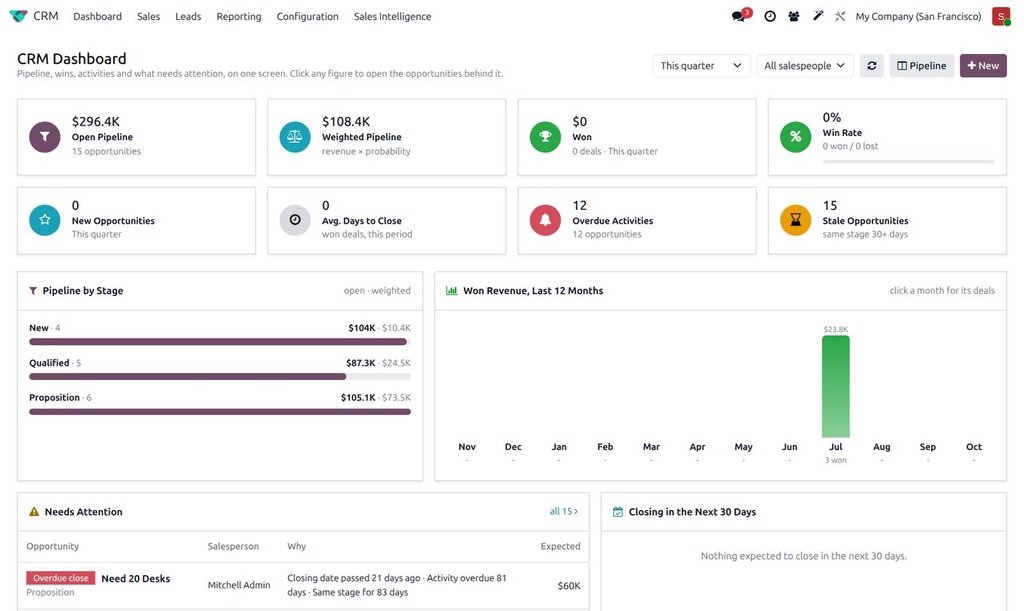
Odoo's CRM reports answer one question at a time. This dashboard answers the ones a sales manager asks every Monday on one screen that loads in a second, with every figure clickable.
What it does
- KPIs: open and weighted pipeline, won this period, win rate, new opportunities, average days to close, overdue activities and stale opportunities.
- Pipeline by stage with open and weighted amounts, and won revenue over the last twelve months.
- Needs attention: opportunities with overdue activities, passed closing dates or no movement, with the reason shown.
- Activity analysis: calls, meetings, emails and to-dos planned, done and overdue, per person.
- Period and salesperson filters that apply to the whole dashboard; click any number to open the opportunities behind it.
- Follows Odoo's colours and dark mode; works on tablets.
How it is used
- Open CRM › Dashboard.
- Pick the period and, if you like, one salesperson.
- Click any card or bar to drill into the matching opportunities or activities.
Who it is for
Sales managers and owners who want the state of sales without building pivot tables.
Requirements: Odoo 19, Community or Enterprise. Extra KPIs can be added on request.